Monday, April 28, 2014

AMD Catalyst Drivers 14.4 Windows 7

AMD's award-winning Catalyst graphics and HD video configuration software delivers unprecedented control of performance and visual quality with AMD Radeon graphics processors. AMD Catalyst drivers deliver stable performance and push the limits of innovation with advanced user-oriented features.

Precision controls for power users. Tweaks for gamers and video enthusiasts. Simple wizard-assisted setup, easy multi-monitor configuration, and ultra reliable operation for working professionals. New user or seasoned expert, AMD Catalyst puts you in charge of The Ultimate Visual Experience.

Industry-leading performance

  • AMD Catalyst updates are focused on improving graphics performance, including enhancements for popular Direct3D and OpenGL game titles.

Innovative and exciting features

  • AMD Catalyst includes the AMD Catalyst Control Center, delivering innovative features and unprecedented control of performance and visual quality with AMD Radeon graphics.

Robust stability

  • Catalyst drivers for Windows Vista and Windows XP are Microsoft WHQL-certified to deliver the industry's most stable and reliable graphics performance.

This version is for the 32-bit version of Vista.

Summary of AMD Catalyst Drivers 14.4 Windows 7

Flash Player 13.0.0.206 (IE)

Summary of Flash Player 13.0.0.206 (IE):

Title: Flash Player 13.0.0.206 (IE)
Filename: flashplayer
Size: 24KB (24,194 bytes)
Requirements: Windows XP / Vista / Windows7 / XP64 / Vista64 / Windows7 64
Languages: en-US
LIC: Freeware
Date added: April 28, 2014
Author: Adobe Systems Inc
www.adobe.com
MD5 F9FA8C1B6C906A643E2D41644B7557DE

Friday, April 25, 2014

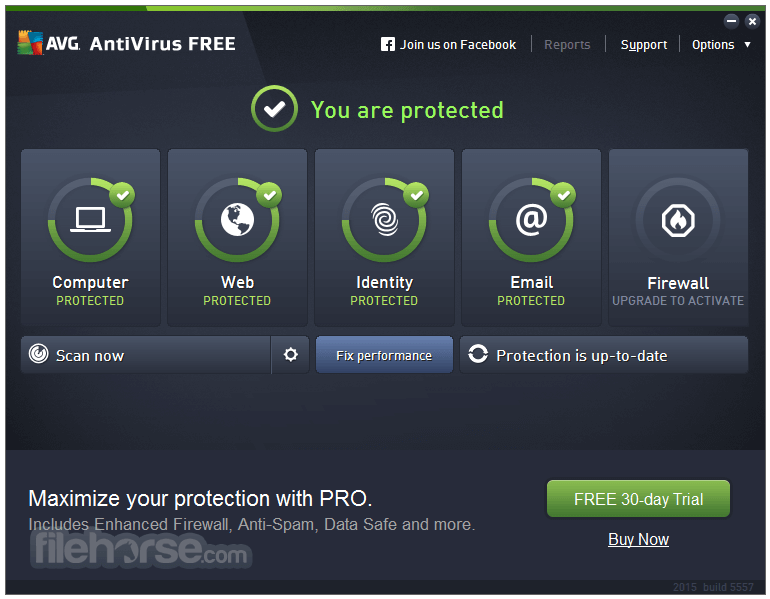
AVG Free Edition 2014 14.0.4577 (32-bit)

  • Requirements:

    Windows 2000 / XP / Vista / Windows 7 / Windows 8

  • Editor / User Rating:

    /
  • Author / Product:

    AVG Technologies / AVG Free Edition (32-bit)

  • Old Versions:

  • Filename:

    avg_free_x86_all_2014_4577a7359.exe

  • MD5 Hash:

    748dcf9abc5db1de09965e6b61d763c8

AVG Anti-Virus Free Edition is am antivirus program which is absolutely free for non-commercial use for the life of the product. Created from the ground up to provide every Windows user brilliant protection duringsurfing, social networking and exchanging data with other people using portable USB storage devices. AVG is quality Anti-Virus proven by over 172 million of users, who have used this software suite and the accompanying cloud services to protect PCs, Macs, mobile phones and tablets against any kind of online threat. It even has integrated anti-theft tools that will enable you to locate your stolen hardware.

Introduced to the public in distant 1992 in Czechoslovakia under the name "Anti-Virus Guard”, this great software reached US in 1998where it was welcomed very warmly. After that moment, AVG continued its incredible rise by not only innovating with their own services, but also purchasing many other companies that helped them to achieve total PC monitoring control and protection against hidden software threats.

The latest version of AVG brings new optimization for surfing the Internet, conducting web searches, or simply keeping up with friends on Facebook, constantly monitoring your online interactions and stopping any kinds of unauthorized software use that is happening “under the hood” that ordinary users simply cannot detect.

In addition to the excellent free version, AVG also offers several premium pancakes of their anti-virus software that are aimed to provide protection to professional users, business and large organizations.

AVG Anti-Virus Free Edition Features:

Exceptional anti-virus protection
Anti-virus protection that automatically updates to protect you from continually evolving threats. As hackers develop new techniques, AVG’s research labs are constantly processing web data to provide new defenses to keep you automatically protected.

Gaming and surfing without interruptions
Get on with your surfing and gaming without interference. Scans operate when you are away from your PC, and it also knows when you are gaming and ensures that the security operates in the background only, leaving you free to play.

Safe downloads
Files are checked before you download them without you having to do a thing. AVG Anti-Virus will also protect you when exchanging files through popular instant messaging like MSN and Yahoo.

Surf and search the web safely
You want to search and surf, but you don’t ever want to go to any infected websites. AVG helps you out by clearly alerting you to threats and keeping you clear of them.

Share your life on Facebook, not viruses
With AVG protecting your system, you can chat and message your friends on Facebook and other social networks in the knowledge that each web page and link is checked for safety. You won’t pick up a malicious link from your friends - and you won’t send one either!

Free support from techies that care
AVG understands the need to stay safely connected to the web no matter your geographical location or time of day - our mission is to provide ongoing peace of mind on a 24/7 basis.

Note: By starting from a null position, you are required to actively choose to install AVG Free or the 30-day trial of AVG Internet Security. This is the 32-bit version.

Tags: avg free edition, avg for windows 8, avg 32 bit, 2014, free anti-virus, antivirus tool, email scanner, avg free 2013, shield, real-time protection, heuristic methods, xp antivirus, win8 antivirus, trojan shield

Description of AVG Free Edition 2014 14.0.4577 (32-bit)

Comodo Dragon Internet Browser 33.0

Comodo Dragon is a Chromium technology-based Browser that offers you all of Chrome's features PLUS the unparalleled level of security and privacy you only get from Comodo. Including a greater level of privacy than Chromium technology offers.

Features:

  • Improved Privacy over Chromium
  • Easy SSL Certificate Identification
  • Fast Website Access
  • Greater Stability and Less Memory Bloat
  • Incognito Mode Stops Cookies, Improves Privacy
  • Very easy to switch from your Browser to the Dragon.

Comodo Dragon Internet Browser 33.0 Description

Saturday, April 19, 2014

Windows Live Writer 16.4.3528

Title: Windows Live Writer 16.4.3528
Filename: wlsetup-web.exe
File size: 1.18MB (1,239,752 bytes)
Requirements: Windows Windows7 / Windows7 64 / Windows8 / Windows8 64
Languages: en-US
LIC: Freeware
Date added: April 17, 2014
Author: Microsoft Corporation
www.microsoft.com
MD5 Checksum: FD16C47494166590F41C2DB1365AD13F

Description of Windows Live Writer 16.4.3528

Thursday, April 17, 2014

Dropbox 2.6.30

Description of Dropbox 2.6.30:

  • System requirements:

    Windows XP / Vista / Windows 7 / XP64 / Vista64 / Windows 7 64 / Windows 8 / Windows 8 64

  • Editor / User Rating:

    /
  • Author / Product:

    Dropbox Team / Dropbox

  • Old Versions:

  • Filename:

    Dropbox 2.6.30.exe

Dropbox is one of the most popular cloud-focused backup software that is currently used by more than 200 million users to syncs files and directories between home computers, mobile devices, friends, family, colleagues and online storage space that is fully controlled by you. Dropbox simply allows anyone to setup incredibly reliable, safe and intuitive way to backup your files to the cloud and keep those files synced with every device you own and share that synced data with other users of your choice. This way, you can not only use it as a backup service, but as a powerful productivity tool both at home and at work. There is no easier way for two online users to exchange files between each other than with Dropbox.

Put your files into your Dropbox on one computer in a directory of your choice, and they'll be instantly available on any of your other computers that you've installed Dropbox on (Windows, Mac, and Linux too!) Because a copy of your files are stored on Dropbox's secure servers, you can also access them from any computer or mobile device using the Dropbox website.

Dropbox client for Windows is very lightweight and fast, enabling users to set up a local directories that will be synced to the cloud. Small application will then reside in your taskbar, notifying you of the current transfers and enabling you to easily share files or directories with other users.

Free version of Dropbox currently gives each user ability to store online up to 2 GB of data, with easy ways to purchase more with cheap subscription packages.

Your files, anywhere

  • Any file you save to Dropbox also instantly saves to your computers, phones, and the Dropbox website.
  • 2GB of Dropbox for free, with subscriptions up to 100GB available.
  • Your files are always available from the secure Dropbox website.
  • Dropbox works with Windows, Mac, Linux, iPad, iPhone, Android and BlackBerry.
  • Works even when offline. You always have your files, whether or not you have a connection.
  • Dropbox transfers just the parts of a file that change (not the whole thing).
  • Manually set bandwidth limits - Dropbox won't hog your connection.

Simple sharing

  • Shared folders allow people to work together on the same projects and documents.
  • Invite friends, family or teammates to a folder. It'll be as if you saved the folder to their computers.
  • See other people's changes instantly.
  • Create photo galleries viewable by anyone you choose.
  • Send a link to any file in your Dropbox using your Public folder.

Dropbox mobile

  • Apps for iPhone, iPad, Android, and BlackBerry keep your Dropbox at hand, even on the go.
  • Bring your files with you when you're on the go.
  • Edit files in your Dropbox from your phone.
  • Easily upload your photos and videos to Dropbox.
  • Share freely with family and friends.

Your stuff is safe

  • Dropbox protects your files without you needing to think about it.
  • Dropbox keeps a one-month history of your work.
  • Any changes can be undone, and files can be undeleted.
  • Secure Sockets Layer (SSL) and AES-256 bit encryption.


Tags: dropbox, dropbox for windows 7, drop box, syncs files, online sharing, filesync, file sharing, online backup, web access, security, privacy, mobile device access, online storage, share folder, storage, synchronization

What's new in this version:

Dropbox 2.6.30
- Fix issue with linking second account for a small number of users on Windows

Dropbox 2.6.29
- Fixes an issue where the second account would get unlinked if email associated with account changes.
- Changes to camera uploads splash.

Dropbox 2.6.27
- Change log not available for this version

Dropbox 2.6.26
- Change log not available for this version

Dropbox 2.6.25
- Fix a crash when quitting Dropbox on Windows XP

Dropbox 2.6.20
- Change log not available for this version

Dropbox 2.6.18
- More translations
- Fix an error on restarting with dual account
- Restart Explorer more gently on install
- More information in startup error dialog
- Don’t modify ctime on files when fixing permissions
- Other small fixes

Dropbox 2.6.15
- Change log not available for this version

Dropbox 2.6.13
- Fix a bug where the client gets stuck at 'Connecting...' when running two accounts
- Fix the wording on the 'your Dropboxes were disconnected' dialog
- Other small fixes

Dropbox 2.6.11
- Fix a bug where the Dropbox folder would not go back to the same place on relink for dual account and DfB users
- Fix a bug where Dropbox wouldn't work if your DfB team name had unicode characters
- Fix incorrect text on setupwizard panel

Dropbox 2.6.10
- Fix a bug where the Dropbox folder would not go back to the same place on relink for dual account and DfB users
- Fix a bug where Dropbox wouldn't work if your DfB team name had unicode characters
- Fix incorrect text on setupwizard panel
- Other small fixes

Dropbox 2.6.8
- Standardize Dropbox folder name for DfB users
- Prevent moving a Dropbox folder into another Dropbox folder
- Prevent two Dropbox folders from having the same name
- Do not merge Dropbox folder with a symlink
- Other small fixes

Dropbox 2.6.7
- Change log not available for this version

Dropbox 2.6.6
- DfB team admin disabling desktop multiaccount linking takes effect immediately
- Other small fixes

Dropbox 2.6.5
- Fix bug where Windows installer would prompt for UAC twice.
- Other small fixes.

Dropbox 2.6.2
- Redesigned Setup Wizard.
- Pause Syncing is now available from the tray popup.
- New Installers for Windows and OS X
- Selective Sync UI significantly more responsive

Dropbox 2.4.10
- Fix incorrect throttling in highly variable internet connections.
- Fix rare memory leak in Finder integration.
- Fix rare bug where database errors would cause a re-sync.
- Other minor fixes.

Dropbox 2.4.9
- Fix an issue preventing Selective Sync from displaying unsynced folders in some cases.
- Splash screen related fixes.
- Other minor fixes.

Tuesday, April 15, 2014

TortoiseSVN 1.8.6 (64-bit)

TortoiseSVN 1.8.6 (64-bit) summary:

TortoiseSVN 1.8.6 (64-bit) is one of the most popular Subversion clients, which is fully integrated with the Windows environment. Once installed, it keeps track of your files and directories (stored in a repository) and all their versions – this enables you to recover older versions or examine the changes made. Developers who have installed TortoiseSVN 1.8.6 (64-bit) on their work machines reported tremendous increase in productivity whenever they were forced into situation that they need to manage different versions of the source code of their programs. With TortoiseSVN 1.8.6 (64-bit), that process is made easy and intuitive, enabling developers from all around the world working on projects of all shapes and sizes to easily identify changes between two or more versions of source code and immediately see problems or potential places for optimizing their code.

TortoiseSVN 1.8.6 (64-bit) is integrated into the Windows shell and can be accesses directly from the Windows Explorer, which makes it easy to use not only for the developers, but for the average computer users as well. App can also be integrated directly into the Microsot Visual Studio via the third party plugins called VisualSVN, VsTortoise, and AnkhSVN, enabling much better integration of versioning oversight into development pipeline.

Today, TortoiseSVN 1.8.6 (64-bit) is regarded as one of the most useful free open source programs that any developer can introduce into their project building, management, optimization and support process, receiving numerous awards from both community awards and internet media outlets.

As a Subversion client, TortoiseSVN 1.8.6 (64-bit) has all the features of Subversion itself, including:

  • Most current CVS features.
  • Directories, renames, and file meta-data are versioned.
  • Commits are truly atomic.
  • Branching and tagging are cheap (constant time) operations.
  • Efficient handling of binary files.